Here are the Top 5 Best Hacking Tools 2017
#1: Metasploit :
Metasploit is available for all major platforms including Windows, Linux, and OS X. Rather than calling Metasploit a collection of exploit tools, I’ll call it an infrastructure that you can utilize to build your custom tools. This free tool is one of the most popular cyber security tools around that allows you to locate vulnerabilities at different platforms. Metasploit is backed by more than 200,000 users and contributors that help you to get insights and uncover the weaknesses in your system.
2. Nmap :
Nmap is available for all major platforms including Windows, Linux, and OS X. I think everyone has heard of this one, Nmap (Network Mapper) is a free open source utility for network exploration or security auditing. It was designed to Nmap rapidly scan large networks, although it works fine against single hosts. Many systems and network administrators also find it useful for tasks such as network inventory, managing service upgrade schedules, and monitoring host or service up-time.
1. Ice-cream Screen Recorder
Ice-cream Screen Recorder can record your entire computer screen or specific parts of the screen. With the software, you can shoot webinars record video calls or conferences game-plays etc.
. Advantages:
.Records videos in MP4, MKV or WebM format.
.Allows audio recording along with the video.
.Offers webcam recording along with screen recording.
.Allows on-screen drawing while capturing the screen.
.Offers hotkey configuration to pause, record and stop the recording.
.Allows saving screenshots to the clipboard or in JPG or PNG extension.
.Offers Project History for quick access to previously captured pictures and videos.
.Disadvantages:
.Free users get a 10-minute cap of screen recording time.
.Offers limited functionalities and editing options in its free edition.
.Its recordings can’t be used for commercial purposes by free users.
2. Ezvid Video Maker
Ezvid Video Maker is a useful desktop or screen recording software. With some clicks, you can record the computer screen to create high-resolution movies You can also add title description, keywords and other meta-info to your recordings.
1. Advantages:
.Auto-saves the videos during recording.
.Allows creating slideshows with the capturing.
.Offers audio recording and voice synthesis features.
.Allows on-screen annotating while recording the screen.
.Enables uploading the recorded videos to YouTube directly.
.Offers webcam recording.
2.Disadvantages:
.Allows recording videos up to 45 minutes.
.Supports uploading videos directly on YouTube only.
.Offers no customization settings for recording the screen.
In this post however understanding this issue we have prepared a list of top 5 video editing tools.
1. AVS Video Editor
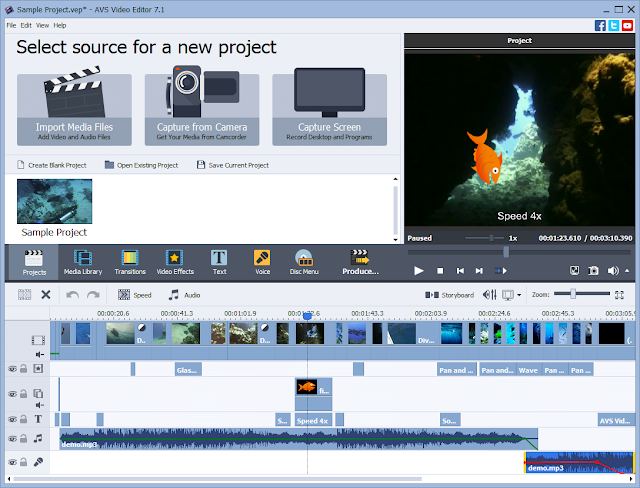
AVS Video Editor can be the first choice of yours when you are looking for an easy to use professional-quality-rich & quick video editor for your Windows computers. AVS offers a number of notable features such as a huge amount of effects, support for Blu-ray videos, multilingual support ability to share videos directly through platforms like Facebook, Flick and MySpace and useful features such as stabilization.
. Supported Platforms: windows.
. Supported Input Formats: AVI, MP4 , MKV, FLV, AMV, 3GP, MPG, DAT , VCD etc.
. Supported Output Formats : AVI, MP4, WMV, SWF, FLV, MPG etc.
. Price: All software from AVS is available as a bundle for $59,but you have an unlimited trial version.
2. Adobe Premiere Pro
Adobe Premier Pro is an immensely-popular, timeline-based video editor that is available for Windows and Mac. In a condition that you are ready to spend, Adobe Premier Pro will be an awesome video editing tool, particularly when we consider features such as Integration with After Effects and Photoshop, top-notch video masking features, superb transitions etc.
. Supported Platforms: Windows,Mac and Cloud.
. Supported Formats: Almost every popular video format.
. Price: Different plans are available through official site of premier pro.


 Posts
Posts

